went on this in David's seminar on friday. easy way of taking you through coding.
found it really easy & helped a lottttt
http://www.codecademy.com/
Showing posts with label Javascript. Show all posts
Showing posts with label Javascript. Show all posts
Monday, 20 February 2012

Wednesday, 7 December 2011
Javascript
here is a rollover mouse image that changes on the "ladyboy" page for the user to guess what images are ladyboys and what aren't. Image changes to a tick or cross to show if they are or not.


Friday, 18 November 2011
JavaScript
JavaScript Events.
When a user causes an event to happen on an HTML page, such as clicking on a link, a piece of JavaScript can be executed. Most HTML tags have certain events that can be used to trigger JavaScript, examples of such events are ‘onClick’ and ‘onMouseOver’. When developing a web page, which uses such events, you need to be careful about compatibility issues as Netscape Navigator and Microsoft Explorer differ in the type of events each HTML tag is capable of supporting.

< a onClick="document.write('you clicked me!');">click here< / a >
< html >
< body >
< img src ="Img/elep.jpg" name="elephant " onmouseover="document.images['elephant'].src='Img/elep.jpg';" onmouseout="document.images['elephant'].src='Img/monkey.jpg';">
< /body >
< /html >
When a user causes an event to happen on an HTML page, such as clicking on a link, a piece of JavaScript can be executed. Most HTML tags have certain events that can be used to trigger JavaScript, examples of such events are ‘onClick’ and ‘onMouseOver’. When developing a web page, which uses such events, you need to be careful about compatibility issues as Netscape Navigator and Microsoft Explorer differ in the type of events each HTML tag is capable of supporting.

< a onClick="document.write('you clicked me!');">click here< / a >
< html >
< body >
< img src ="Img/elep.jpg" name="elephant " onmouseover="document.images['elephant'].src='Img/elep.jpg';" onmouseout="document.images['elephant'].src='Img/monkey.jpg';">
< /body >
< /html >
Friday, 28 October 2011
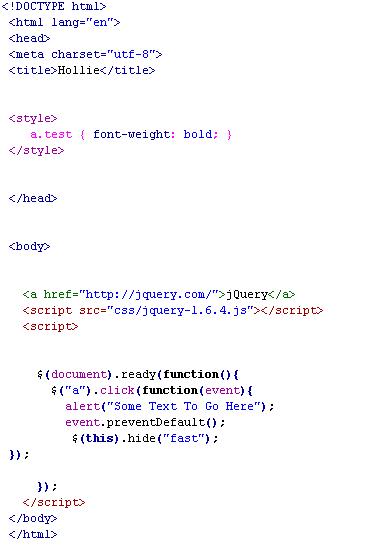
JQuery
"jQuery is a fast and concise JavaScript Library that simplifies HTML document traversing, event handling, animating, and Ajax interactions for rapid web development. jQuery is designed to change the way that you write JavaScript."
http://jquery.com/

http://jquery.com/
Friday, 21 October 2011
Introduction To Javascript
In todays lecture with David we started Javascript.
"Javascript is an easy-to-use programming language that can be embedded in the header of your web pages. It can enhance the dynamics and interactive features of your page by allowing you to perform calculations, check forms, write interactive games, add special effects, customize graphics selections, create security passwords and more."
http://www.webteacher.com/javascript/
http://www.w3schools.com/js/default.asp
We learnt some simple codes to start with such as how to say hello:
< html >
< body >
< script language="javascript" >
document.write('Hello');
< /script >
< /body>
< /html >
& how to repeat a word however amount of times, here shows x 6 times. Could change it to any number:
< html >
< body >
< script language="javascript" >
row=0;
while (row<6) { document.write("X "); row=row+1; } < /script >
< /body >
< /html >
We then had the task to ask the user to guess a number and tells the
user if it is high, low or bulls eye. We had to read through online tutorials to find this. I found it quite difficult, although reading through it online meant I could try other codes such as pop up box & loops.
The simple codes such as "hello" and repeating it in sequence was quite easy to grasp however I stuggled with the harder stuff so going to read it on w3schools this week & try to get my head around it all.
"Javascript is an easy-to-use programming language that can be embedded in the header of your web pages. It can enhance the dynamics and interactive features of your page by allowing you to perform calculations, check forms, write interactive games, add special effects, customize graphics selections, create security passwords and more."
http://www.webteacher.com/javascript/
http://www.w3schools.com/js/default.asp
We learnt some simple codes to start with such as how to say hello:
< html >
< body >
< script language="javascript" >
document.write('Hello');
< /script >
< /body>
< /html >
& how to repeat a word however amount of times, here shows x 6 times. Could change it to any number:
< html >
< body >
< script language="javascript" >
row=0;
while (row<6) { document.write("X "); row=row+1; } < /script >
< /body >
< /html >
We then had the task to ask the user to guess a number and tells the
user if it is high, low or bulls eye. We had to read through online tutorials to find this. I found it quite difficult, although reading through it online meant I could try other codes such as pop up box & loops.
The simple codes such as "hello" and repeating it in sequence was quite easy to grasp however I stuggled with the harder stuff so going to read it on w3schools this week & try to get my head around it all.
Subscribe to:
Posts (Atom)